Let's Encrypt certificates expire every 90 days. Manual renewal is tedious and error-prone — missing a renewal means expired certificates, browser warnings, and potential site downtime. Automation eliminates human error entirely.
What You'll Need
SSH access to your cPanel account (root privileges not required)
acme.sh installed in your home directory
A domain with a working webroot for HTTP validation
Step 1: Install acme.sh (If Not Already Installed)
This installs to ~/.acme.sh without requiring root access.
Step 2: Write the Issue + Deploy Script
The process involves two stages: issuing the certificate (via Let's Encrypt validation) and deploying it to cPanel using the cpanel_uapi hook.
Here's the complete script:
renew_ssl_cpanel.sh
#!/bin/bash## renew_ssl_cpanel.sh# Issues/renews a Let's Encrypt cert via acme.sh and auto-installs it into cPanel# via the built-in cpanel_uapi deploy hook.## Run as the cPanel account user that owns the domain — no root needed.set-euopipefail# ---- CONFIG: edit these for your domain ----DOMAIN="yourdomain.com"ALIAS="www.yourdomain.com"WEBROOT="/home/youruser/yourdomain.com"ACME_SH="$HOME/.acme.sh/acme.sh"LOGDIR="$HOME/logs"mkdir-p"$LOGDIR"LOGFILE="$LOGDIR/acme_cpanel_deploy.log"echo"===== $(date) : Starting cert issue/renew for $DOMAIN =====">>"$LOGFILE"# 1. Issue (or renew) the certificateif"$ACME_SH"--issue-d"$DOMAIN"-d"$ALIAS"-w"$WEBROOT"--serverletsencrypt>>"$LOGFILE"2>&1; thenecho"Cert issued OK for $DOMAIN">>"$LOGFILE"elseecho"Cert issuance FAILED for $DOMAIN - aborting deploy">>"$LOGFILE"exit1fi# 2. Deploy into cPanel via UAPIif"$ACME_SH"--deploy-d"$DOMAIN"--deploy-hookcpanel_uapi>>"$LOGFILE"2>&1; thenecho"Cert deployed OK into cPanel for $DOMAIN">>"$LOGFILE"elseecho"Deploy FAILED for $DOMAIN">>"$LOGFILE"exit1fiecho"===== $(date) : Done for $DOMAIN =====">>"$LOGFILE"
Save as ~/scripts/renew_ssl.sh and make executable:
shell
chmod+x~/scripts/renew_ssl.sh
Important: the --force flag is omitted deliberately. Without it, acme.sh only reissues certificates nearing expiry — preventing unnecessary rate limit hits across multiple domains.
This runs weekly on Sundays at 3:15 AM. Since acme.sh auto-renews around day 60 of the 90-day cycle, weekly checks provide ample buffer with redundancy for transient failures.
How the Deploy Hook Actually Works
The cpanel_uapi deploy hook invokes cPanel's UAPI (SSL::install_ssl) directly. When run as the domain-owning cPanel user (not root), no additional permissions are required — cPanel inherently trusts the account to manage its own certificates.
Wrapping Up
With this setup, the entire SSL lifecycle runs unattended weekly. Certificates issue, validate, and install automatically. The only ongoing maintenance is occasional log review or implementing log rotation.
No more calendar reminders. No more manual WHM logins. Just a cert that renews itself, quietly, in the background.
Where this fits into a bigger picture
Certificate renewal is one small piece of the production hardening we build into every custom software engagement — the unglamorous automation that keeps a system reliable long after launch. If your team is stretched thin on this kind of operational work, that's often a sign it's time for dedicated developers rather than another one-off fix.
Founder of GeekFolks and a full-stack developer with 5+ years of experience across PHP (Laravel, Yii2), Node.js, and Next.js — building scalable, cloud-native systems with a growing focus on AI-driven products.
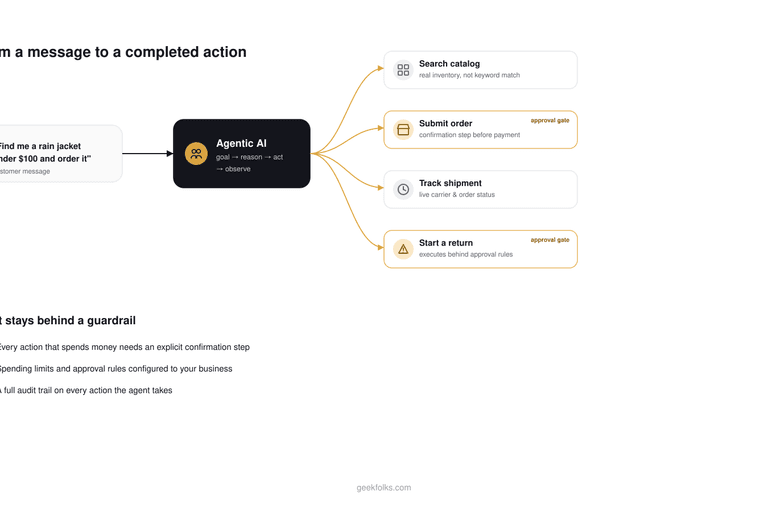
Most "AI for e-commerce" talk stops at product recommendations. Agentic AI goes further: it can search your catalog, place an order, and check a shipment status as real actions. Here's what that actually looks like, and where the guardrails have to sit.
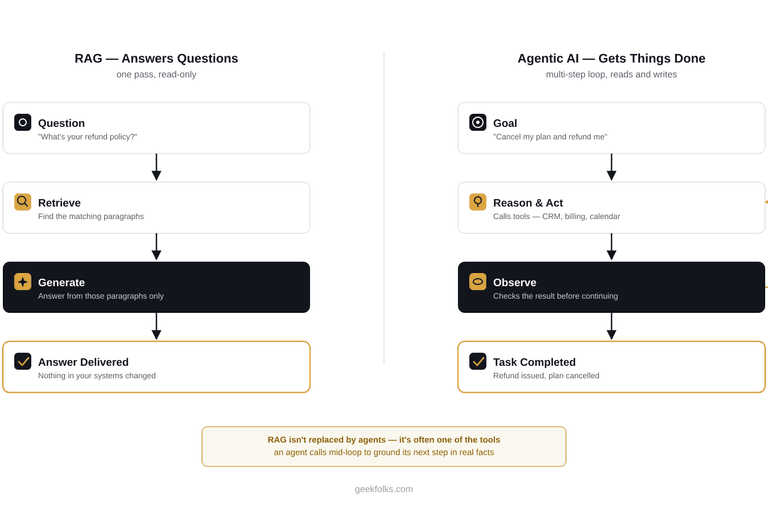
RAG answers questions from your data. Agentic AI takes multi-step action using it. Here's how to tell which one your business needs, when you need both, and why getting this wrong is the most common way AI budgets get wasted.
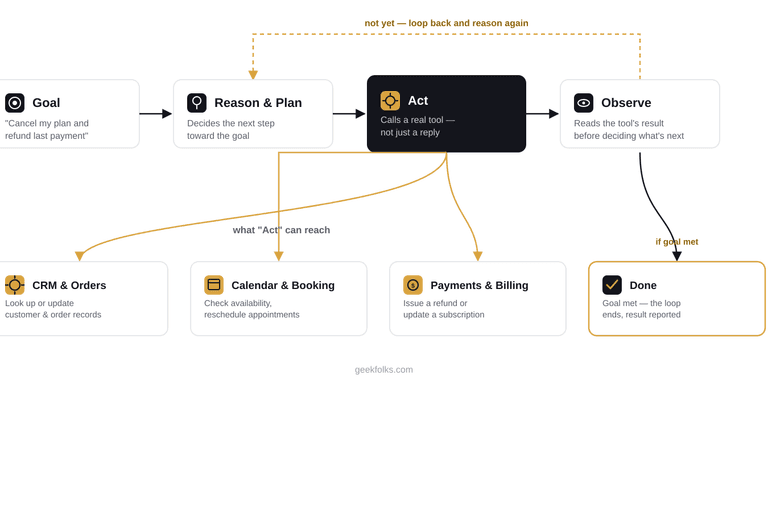
A chatbot answers questions. An agent gets things done. Here's the real loop behind agentic AI — goal, reason, act, observe — traced through a live refund request, plus what it takes to build one safely for a real business.