TL;DR: A business chatbot works by turning a visitor's message into intent, retrieving grounded facts from your knowledge base and internal systems, then either answering directly or handing off to a human. You can ship a narrow, well-scoped version of this in a few weeks — the pattern below is the same one behind most production support bots today.
Who is this for? Founders and engineering teams weighing whether to add a chatbot to a business website, and developers who want a concrete architecture rather than a vendor pitch.
Why businesses add a chatbot
A website chatbot earns its place when it removes friction at a specific, repeated moment — not as a generic decoration. The common wins:
Instant first response: visitors get an answer in seconds instead of waiting for a support queue.
Deflected tickets: the same 10–20 questions (pricing, hours, order status) stop eating support time.
After-hours coverage: leads and questions get captured outside business hours instead of bouncing.
Faster sales qualification: the bot can ask the two or three questions a rep would ask first.
How a chatbot actually works
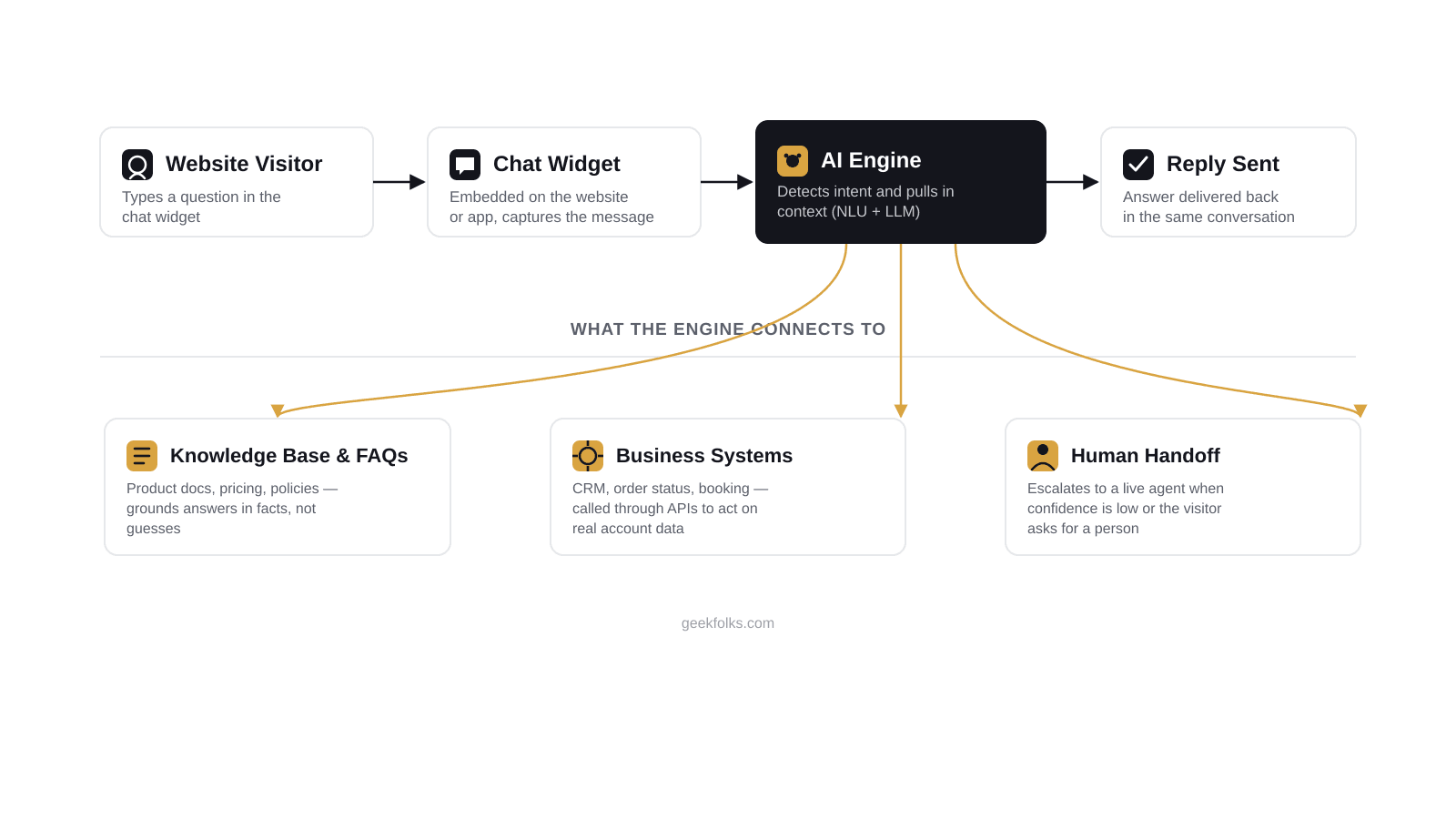
Strip away the marketing language and every production chatbot follows the same pipeline: capture the message, understand what's being asked, pull in facts it's actually allowed to state, then respond or escalate.
1. The widget captures the message
A small embedded script on the website opens a chat panel and posts each message to a backend endpoint, along with a conversation ID so the backend can keep context across turns.
2. Intent understanding (NLU vs. LLM)
Older chatbots ran on rule-based intent classifiers: a fixed set of buttons or a decision tree matched against keywords. Most current implementations use an LLM instead, which understands free-form text without pre-defining every phrasing — at the cost of being less predictable. The reliable pattern is a hybrid: route obvious cases ("track my order", "talk to a person") through cheap, deterministic logic, and fall back to the LLM only for open-ended questions.
3. Grounding answers in real data (RAG)
An LLM with no context will confidently invent a return policy that doesn't exist. Retrieval-Augmented Generation (RAG) fixes this: your docs, FAQs, and policies are split into chunks, embedded into a vector store, and at query time the chunks most relevant to the visitor's question are retrieved and given to the model as context, with an instruction to answer only from what it was given.
4. Connecting to business systems
Answering questions is half the job — a useful bot can also act. "Function calling" (or "tool use") lets the model decide it needs to call getOrderStatus(orderId) or checkAvailability(date) against your real CRM, order system, or booking API, then use the result in its reply instead of guessing.
5. Knowing when to hand off to a human
A chatbot that never escalates will eventually confidently mislead someone. Trigger a handoff on: low model confidence, an explicit request for a person, and anything touching refunds, complaints, or legal/medical/financial claims.
A minimal implementation you can build today
Scope the first use case narrowly — FAQ plus order status is plenty for a v1. Resist covering every department on day one.
Build the knowledge base — embed your docs, FAQ, and policies into a vector store (pgvector, Pinecone, or similar).
Wire a chat endpoint — retrieve relevant context, prompt the model, return the reply.
Add one business-system integration behind a tool/function call, not a hard-coded answer.
Add guardrails and logging — confidence thresholds, rate limits, and full conversation logs — before it goes live.
A trimmed version of step 3, as a Next.js API route:
app/api/chat/route.ts
// app/api/chat/route.tsimport { NextRequest, NextResponse } from'next/server'import { embedQuery, searchKnowledgeBase } from'@/lib/chatbot/retrieval'import { getOrderStatus } from'@/lib/integrations/orders'import { chatCompletion } from'@/lib/chatbot/llm'exportasyncfunctionPOST(req:NextRequest) {const { message, conversationId } =await req.json()// 1. Retrieve the knowledge relevant to this questionconstqueryEmbedding=awaitembedQuery(message)constcontext=awaitsearchKnowledgeBase(queryEmbedding, { topK: 4 })// 2. Let the model answer from context, or call a tool for live dataconstreply=awaitchatCompletion({ system:'You are the support assistant for Acme Co. Only answer from the '+'provided context. If you are not confident, say so and offer a human.', context, message, conversationId, tools: [ { name: 'getOrderStatus', description: "Look up a customer's order status by order ID",run: async ({ orderId }: { orderId:string }) =>getOrderStatus(orderId), }, ], })// 3. Escalate low-confidence or explicit human requestsif (reply.confidence <0.55|| reply.wantsHuman) {return NextResponse.json({ ...reply, escalate: true }) }return NextResponse.json(reply)}
Warning
Never let the model improvise pricing, refund policy, or legal claims. Those answers must come from a retrieved document or a tool call against a real system — not free generation.
Metrics that tell you it's working
Containment rate: % of conversations resolved without a human.
Handoff rate and reason: why conversations escalate, not just how many.
CSAT on bot conversations: tracked separately from human-handled ones.
Deflected ticket volume: the support-hours proxy that justifies the investment.
Common pitfalls
Shipping with no human fallback — every conversation needs an exit that isn't a dead end.
No monitoring of failed or looping conversations — these are the fastest way to find gaps in the knowledge base.
Treating launch as the finish line — the knowledge base needs the same upkeep as the docs it's built from.
One bot covering every department — narrow, well-grounded scope beats broad and unreliable.
None of this requires a large team — a narrowly scoped bot with a real knowledge base and one system integration is a realistic first build. The architecture above is the same one we use when we build these for clients.
Building this into your own site
This is the exact kind of feature covered under our AI Website Chatbot service — grounding model output in your real data, evaluating accuracy before it reaches a customer, and operating the system reliably in production, not just a demo.
If you want the retrieval mechanics behind the chatbot in more depth, see The Retrieval Loop, and for when a chatbot alone isn't enough and you need the system to actually take action, see RAG vs Agentic AI.
Founder of GeekFolks and a full-stack developer with 5+ years of experience across PHP (Laravel, Yii2), Node.js, and Next.js — building scalable, cloud-native systems with a growing focus on AI-driven products.
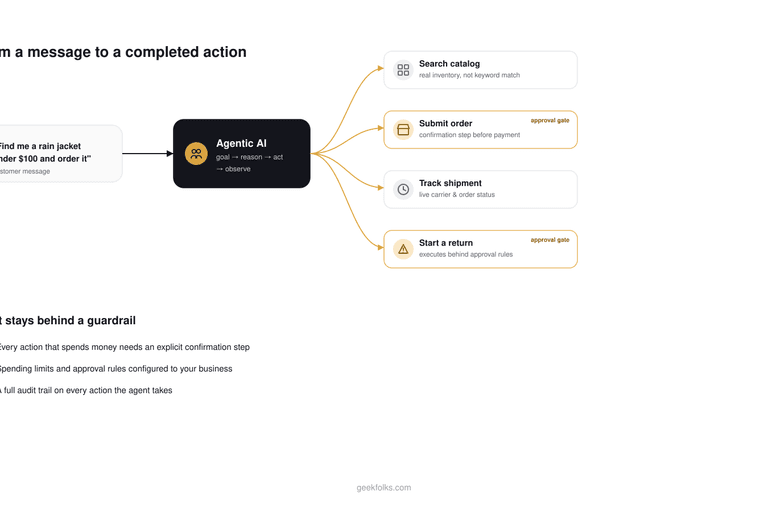
Most "AI for e-commerce" talk stops at product recommendations. Agentic AI goes further: it can search your catalog, place an order, and check a shipment status as real actions. Here's what that actually looks like, and where the guardrails have to sit.
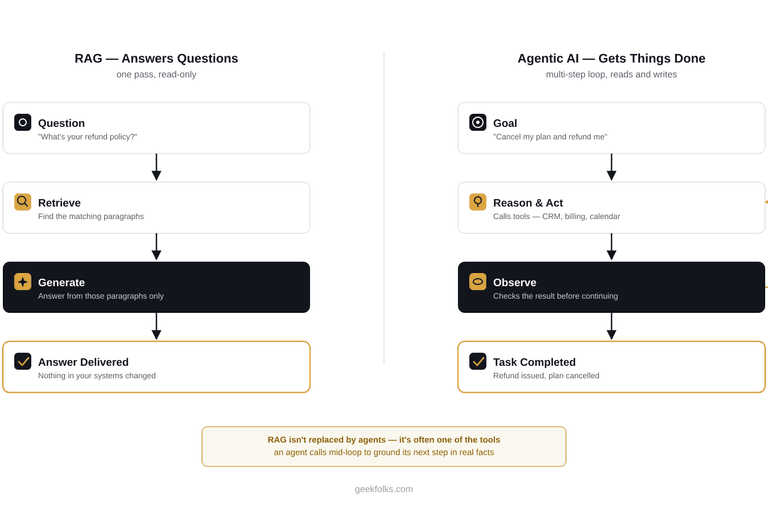
RAG answers questions from your data. Agentic AI takes multi-step action using it. Here's how to tell which one your business needs, when you need both, and why getting this wrong is the most common way AI budgets get wasted.
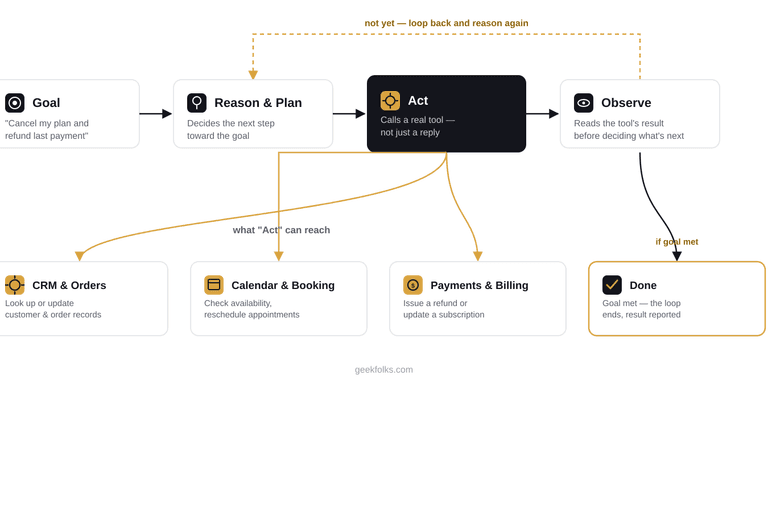
A chatbot answers questions. An agent gets things done. Here's the real loop behind agentic AI — goal, reason, act, observe — traced through a live refund request, plus what it takes to build one safely for a real business.